


Futures Trading Journal Template (Dark Mode)
Auto-applied at checkout
Buy 2+ items → Extra 40% OFF on total
Grab this template and 4 more with SpreadsheetsHub Membership
Get 5 TemplatesShop with confidence
The Ultimate Tool for Serious Futures Traders | Excel & Google Sheets
Trade smarter — not harder.
The Futures Trading Journal – Dark Edition is a powerful, performance-driven spreadsheet built for professional and active futures traders who want clarity, precision, and control in every trade.
Its dark interface isn’t just about aesthetics — it’s designed for long trading sessions, reduced eye strain, and enhanced focus during market analysis.
Features:
- Advanced Trade Tracking – track every trade with full detail, from entry and exit prices to contract type, risk/reward ratio, and profit or loss, across all your futures accounts.
- Partial Entries & Exits Support – log multiple entries or exits per position to reflect true scaling strategies, ideal for traders managing multi-lot futures contracts.
- Compatible with Popular Futures Markets – supports E-mini S&P 500, Micro Nasdaq, Micro Russell, Micro Dow Jones, Micro Bitcoin, Micro Ether, Micro Gold, and Micro Silver, with full customization for any futures contract.
- Strategy Performance Analysis – instantly view win rates, average return per trade, expectancy, R-multiples, and risk exposure to identify consistently profitable setups.
- Risk Management Dashboard – built-in tools for risk per trade, position sizing, and drawdown control to keep your trading disciplined and data-driven.
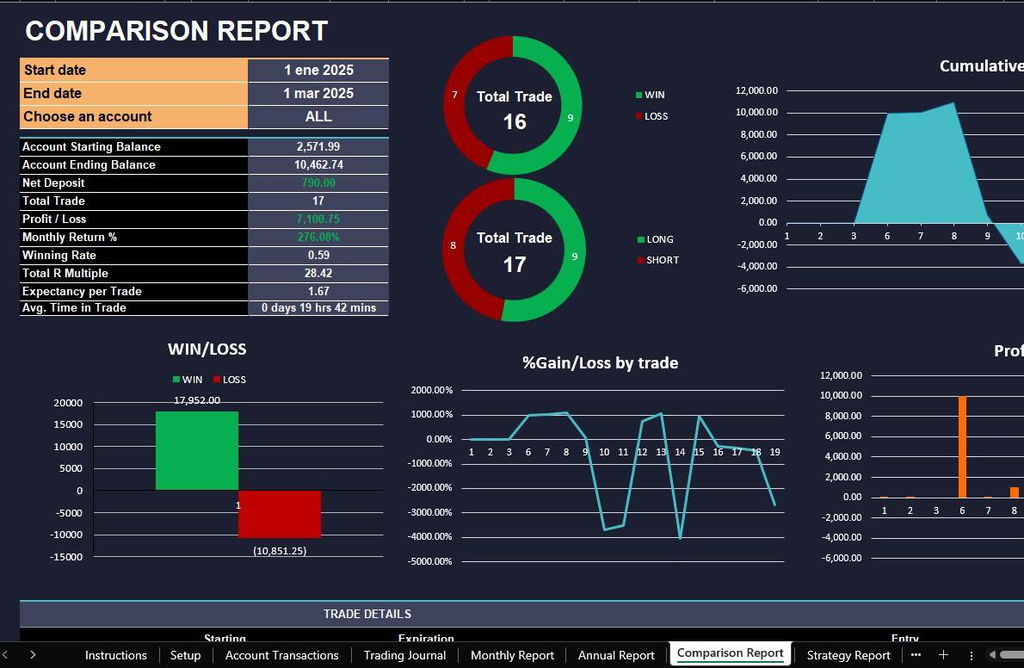
- Visual Performance Insights – high-contrast dark charts for tracking monthly P&L, cumulative gains, risk/reward distributions, and win/loss ratios.
- Monthly & Annual Reports – auto-generated performance summaries with profit/loss, win rate, average expectancy, and return percentages.
- Comparison & Strategy Reports – compare strategies, accounts, or date ranges to clearly see what drives results and what holds them back.
- Perfect for Active Futures Traders – whether you scalp, day trade, or swing trade futures, this journal delivers structure, clarity, and actionable analytics.
How It Works
- Enter your trade data and account details.
- Filter results by strategy, account, or period.
- Review automated reports and risk analysis.
- Use visual dashboards to refine your trading approach.
Why Traders Love the Dark Edition
This version brings everything pros need — precision analytics, custom reporting, and visual comfort — all in one clean, dark interface.
It’s not just a spreadsheet — it’s your command center for futures trading performance.
WHAT’S INCLUDED?
- Step-by-step instructions
- 4 Templates of Spreadsheets
- Sample Google Sheet with Mock Data
- Blank Google Sheet
- Sample Excel with Mock Data
- Blank Excel
- Editable in Google Sheets and Microsoft Excel
- Compatible with MAC, PC, Phones, or Tablets
FEATURES & LIMITATIONS
- Automated Calculations: All totals, charts, and summaries update automatically when data is entered. No manual math required.
- Currency Customization: For all budget and finance-related templates, you can easily change the currency symbol (USD, EUR, GBP, etc.) in just a few clicks.
- Protected Formulas: Certain cells and tabs are locked to prevent accidental deletion of complex formulas, ensuring your template works perfectly. However, no passwords are required—you can easily unlock the sheets if you wish to customize the structure.
- Language: This template is provided in English
- No Macros: We use advanced formulas instead of VBA macros, making the files safer and more compatible across different devices.
HOW IT WORKS & REQUIREMENTS
SYSTEM REQUIREMENTS:
To ensure all features and automated functions work correctly, you will need:
- Microsoft Excel: A subscription to Microsoft 365 (formerly Office 365) is strictly required. Older versions (Excel 2019 or earlier) may not support all formulas.
- Google Sheets: A free Google Account if you prefer using the web-based version.
- Device: A desktop or laptop is highly recommended for the best experience. Mobile devices may have limited editing capabilities.
HOW IT WORKS:
- Purchase and download your files instantly.
- Open the PDF file to access your unique Google Sheets link.
- Open the Excel file directly if using Microsoft 365.
- Follow the setup instructions inside and start planning!
IMPORTANT TO KNOW:
- Compatibility: This template is exclusively designed for Microsoft 365 and Google Sheets. It is not compatible with Numbers (Apple), LibreOffice, or OpenOffice.
- Refund Policy: Due to the instant nature of digital downloads, no refunds or exchanges can be given once the files are downloaded. Please verify your software compatibility before purchase.
- Personal Use Only: Your purchase grants you a single-user license. Re-selling, sharing, or distributing this template in any form is strictly prohibited and protected by copyright law.
DISPLAY & COLOR DISCLAIMER: The visual appearance of the spreadsheet may vary slightly depending on your screen resolution, color settings, and device hardware. For the best experience, we recommend using a desktop or laptop.
NEED HELP? If you have any questions, feel free to reach out to us at spreadsheetshub.office@gmail.com or info@spreadsheetshub.com. You can also contact us on WhatsApp for assistance.
| Plan Comparison |
LIFETIME ACCESS Futures Trading Journal |
SaaS Journals TraderVue, TradesViz, etc. | Free Tools |
|---|---|---|---|
| Payment Structure | $25.99 One-time payment | $30 — $79 Every month | $0 |
| 💰 YOUR SAVINGS (1 Year) | SAVE UP TO $900+ | -$360 to -$948 | $0 |
| Privacy & Safety | ✓ No API Keys Needed Zero risk of account leaks | ✕ Requires API Access 3rd party servers | Low Privacy |
| Futures Contracts Support | ✓ Futures, Crypto & Metals Major instruments and mini/micro contracts | Delayed Sync Service dependent | Basic Only |
| Ownership | ✓ 100% Lifetime Access File is yours forever | ✕ Subscription LockNo pay = No access | Lifetime |
| Support | ✓ Premium Level | ✓ Professional | ✕ Not |
| Platform | Google Sheets / Excel | Web App | Spreadsheet |
Con la IA me demoro demasiado dando instrucciones y nunca obtuve una plantilla igual a la que descargue aqui.

I recently purchased this trading journal template, and I’m really impressed. It’s clean, well‑structured, and includes everything I need to track and analyze my trades effectively. The design is intuitive and makes the whole process easier and more organized.
Overall, it’s one of the most complete and professional templates I’ve used. Highly recommended for anyone looking to improve their trading workflow.
I bought the Futures Spreadsheet to get better organized with my trades, and it surprised me because it shows me more about myself than I ever imagined.
It brought more clarity and objectivity to my trading.
It revealed some behaviors about myself that I wasn’t even aware of.
Now I track my trades daily.
I Like the sheet. Looks nice and has a nice overview
Sehr schönes Tool
Danke
SUPEROU EM MUITO A ESPECTATIVA...O FICHEIRO E FANTASTICO PARA USO DIARIO
Dark mode keeps me focused
I can see which trades worked best
Helps me avoid repeating mistakes
I feel more organized and confident
Makes reviewing trades quick
I can track intraday vs overnight trades
Everything is in one place now
Helps me see my real gains
Logging spreads is a breeze
I can track roll yield easily
Helps me check session performance
Partial exits are smooth and simple
Dark mode is easy on my eyes
I can log every tick without stress
No more messy spreadsheets
P&L updates automatically, love it
Can track multiple accounts easily
Helps me spot mistakes fast
I finally track all my futures trades
Logging is simple and clean
I can see exactly where I’m winning
Helps me stay on top of my contracts
Dark mode makes long sessions easier
Partial exits are really handy
Love how fast I can log trades
Helps me see real results
Dark mode is perfect for long sessions
I use it for all my futures trades

