
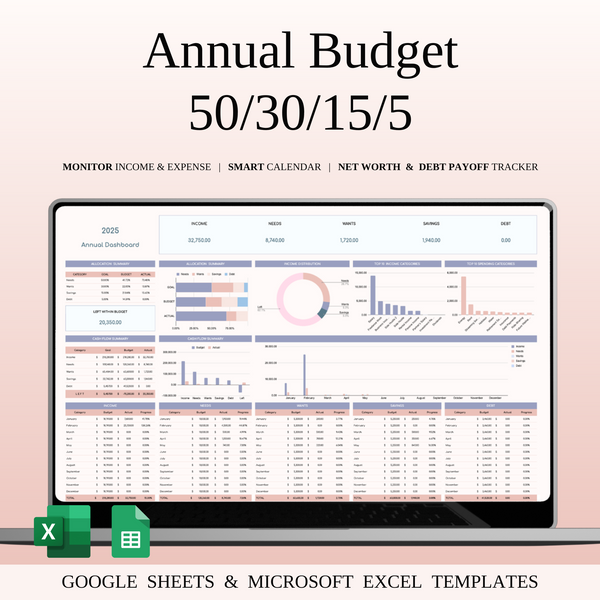


Annual 50/30/15/5 Budget Spreadsheet Template in Excel & Google Sheets
Auto-applied at checkout
Buy 2+ items → Extra 40% OFF on total
Grab this template and 4 more with SpreadsheetsHub Membership
Get 5 TemplatesShop with confidence
This Annual 50/30/15/5 Budget Spreadsheet Template is Premium planner designed to help you manage your finances and stay on top of your spending in a simple, organized way. Using the well-known 50/30/15/5 budgeting method, this template allows you to allocate your income across four key categories: needs, wants, savings, and debt repayment, ensuring you achieve a balanced financial life and maintain control over your budget throughout the year.
How to Use the Annual 50/30/15/5 Budget Spreadsheet | Step-by-Step Video Tutorial
Key Features:
- Income & Expense Tracker: Easily input your income sources and track your expenses to get a clear picture of where your money goes each month.
- Annual Budgeting: This template is designed for yearly tracking, helping you monitor your budget for all 12 months, ensuring long-term financial success.
- 50/30/15/5 Allocation: Allocate your income into categories:
- 50% for Needs (essential expenses such as rent, utilities, and groceries),
- 30% for Wants (discretionary spending like dining out, entertainment, etc.),
- 15% for Savings (savings for emergency funds, retirement, and future goals),
- 5% for Debt Repayment (paying off debts).
- Goal Tracking: Set savings goals and track your progress to ensure you're staying on track with your financial objectives.
- Expense Categories Customization: Tailor categories to suit your unique financial needs and goals.
- Monthly Overview & Annual Comparison: Compare your monthly expenses with the annual budget, helping you stay aligned with your financial plans.
- Automated Formulas: Built-in formulas to automatically calculate percentages and totals, saving you time and effort.
Benefits:
- Simple & Efficient: The template is easy to use, with all formulas and categories already set up for you, making budgeting effortless.
- Clear Financial Picture: Stay on top of your spending and savings with a clear breakdown of your monthly and annual finances.
- Stay on Budget: The 50/30/15/5 method offers an easy way to track your finances, helping you make smart decisions and avoid overspending.
- Year-Round Planning: Plan ahead for the entire year and ensure you’re sticking to your financial goals over the long term.
- Customizable & Flexible: Adapt the template to fit your lifestyle and financial situation with the option to add or modify categories.
Who is it for:
This template is perfect for anyone looking to take control of their finances, whether you're new to budgeting or have been managing your money for years. It's ideal for:
- Individuals who want a simple yet effective way to manage their finances.
- People looking to save more, reduce debt, and achieve financial goals.
- Anyone seeking to create a structured approach to budgeting and track their financial progress year-round.
The Annual 50/30/15/5 Budget Spreadsheet Template is your key to smart financial planning and efficient money management, so you can stay on top of your finances and achieve your goals with confidence!
WHAT’S INCLUDED?
- Step-by-step instructions
- 4 Templates of Spreadsheets
- Sample Google Sheet with Mock Data
- Blank Google Sheet
- Sample Excel with Mock Data
- Blank Excel
- Editable in Google Sheets and Microsoft Excel
- Compatible with MAC, PC, Phones, or Tablets
FEATURES & LIMITATIONS
- Automated Calculations: All totals, charts, and summaries update automatically when data is entered. No manual math required.
- Currency Customization: For all budget and finance-related templates, you can easily change the currency symbol (USD, EUR, GBP, etc.) in just a few clicks.
- Protected Formulas: Certain cells and tabs are locked to prevent accidental deletion of complex formulas, ensuring your template works perfectly. However, no passwords are required—you can easily unlock the sheets if you wish to customize the structure.
- Language: This template is provided in English
- No Macros: We use advanced formulas instead of VBA macros, making the files safer and more compatible across different devices.
HOW IT WORKS & REQUIREMENTS
SYSTEM REQUIREMENTS:
To ensure all features and automated functions work correctly, you will need:
- Microsoft Excel: A subscription to Microsoft 365 (formerly Office 365) is strictly required. Older versions (Excel 2019 or earlier) may not support all formulas.
- Google Sheets: A free Google Account if you prefer using the web-based version.
- Device: A desktop or laptop is highly recommended for the best experience. Mobile devices may have limited editing capabilities.
HOW IT WORKS:
- Purchase and download your files instantly.
- Open the PDF file to access your unique Google Sheets link.
- Open the Excel file directly if using Microsoft 365.
- Follow the setup instructions inside and start planning!
IMPORTANT TO KNOW:
- Compatibility: This template is exclusively designed for Microsoft 365 and Google Sheets. It is not compatible with Numbers (Apple), LibreOffice, or OpenOffice.
- Refund Policy: Due to the instant nature of digital downloads, no refunds or exchanges can be given once the files are downloaded. Please verify your software compatibility before purchase.
- Personal Use Only: Your purchase grants you a single-user license. Re-selling, sharing, or distributing this template in any form is strictly prohibited and protected by copyright law.
DISPLAY & COLOR DISCLAIMER: The visual appearance of the spreadsheet may vary slightly depending on your screen resolution, color settings, and device hardware. For the best experience, we recommend using a desktop or laptop.
NEED HELP? If you have any questions, feel free to reach out to us at spreadsheetshub.office@gmail.com or info@spreadsheetshub.com. You can also contact us on WhatsApp for assistance.

